
A virtual contract note on Rupeezy is a quick, reference-only summary of the charges on an executed order — the statutory charges plus Rupeezy's brokerage — that you can view straight after your trade fills. It gives you an instant view of what a trade cost, ahead of the official contract note that is emailed to you at the end of the day.
What does the virtual contract note show?
The virtual contract note breaks down the charges on your executed order into two groups, and gives you the total for that trade:
Statutory charges
- Securities Transaction Tax (STT)
- Exchange Transaction Charges
- SEBI Charges
- Stamp Duty
- GST
- Investor Protection Fund Trust (IPFT)
- Clearing Charges
Rupeezy Charges
- Brokerage
Below these, you will see the Total charges for the trade, along with a summary of the order itself — the segment, average price, quantity, order time and exchange. There is also a View My Brokerage Plan link if you want to check the brokerage you are on.
Important: The virtual contract note is for reference only. It does not include DP charges — those appear on the official contract note that is emailed to you. Treat the virtual contract note as an at-a-glance estimate, not the final legal record.
How do I view my virtual contract note?
You can open the virtual contract note for any executed order from the Orders screen on the Rupeezy app.
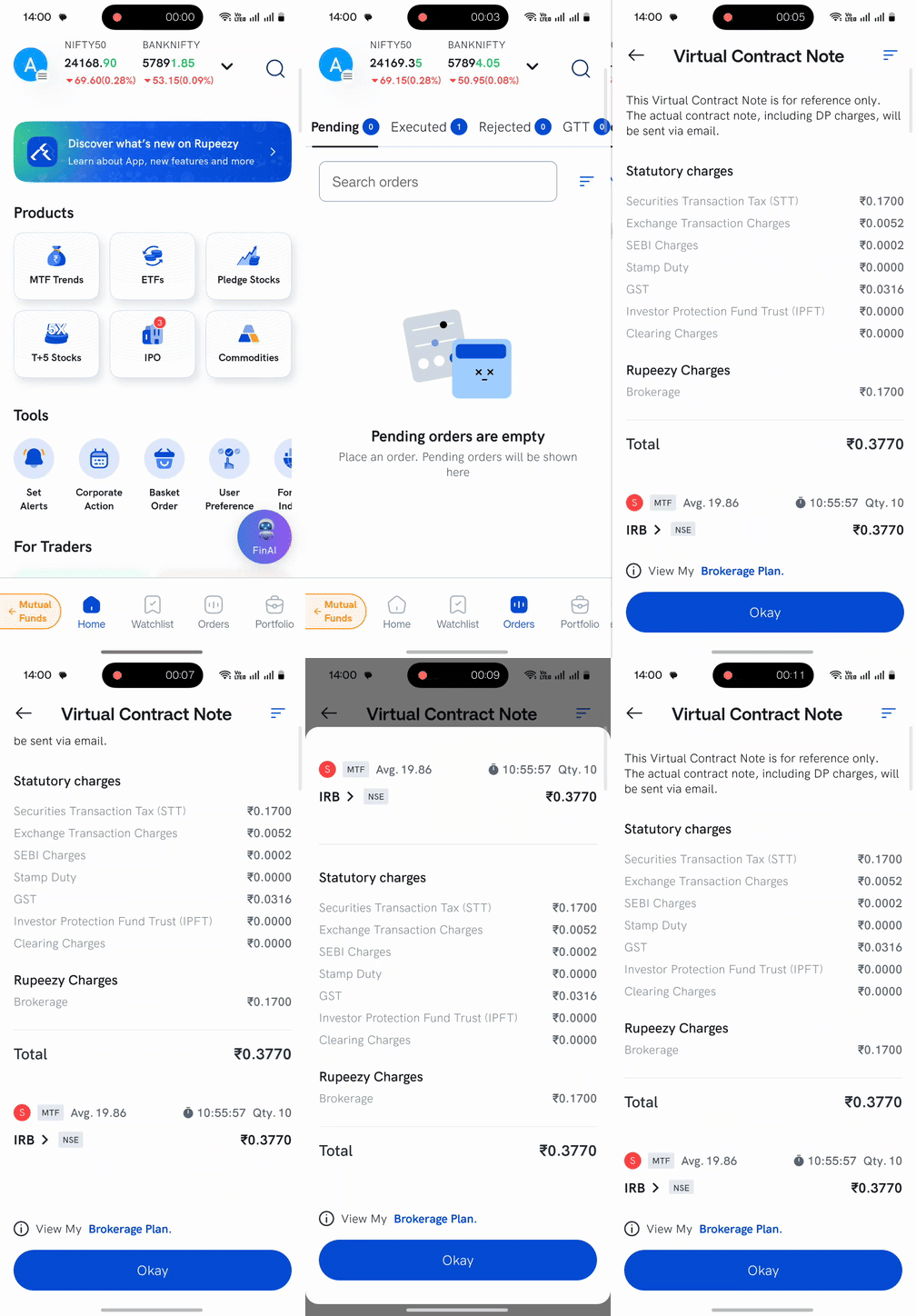
1. Open Orders — on the Rupeezy app, tap Orders in the bottom navigation bar. 2. Go to Executed — switch to the Executed tab to see your filled orders. 3. Tap Contract Note — on the executed order, tap the Contract Note option. 4. Review the charges — the Virtual Contract Note opens with the full charge breakdown and total. Tap Okay to close it.
How is it different from the contract note emailed to me?
They are two different documents for two different purposes:
- Virtual contract note — instant and per-trade, shown in the app right after your order executes. It is a reference-only estimate and does not include DP charges.
- Official contract note — the end-of-day, legally binding record of your day's trades, sent to your registered email and available on the Dock back-office app. It includes DP charges.