
A margin pledge allows you to use your shares as collateral to receive interest-free trading margins. By pledging your shares through the Rupeezy app, you can increase your trading power without selling your holdings.
Note: The margin received by pledging shares can be used for trading in the F&O segment and the equity intraday & MTF segment.
How do I pledge shares?
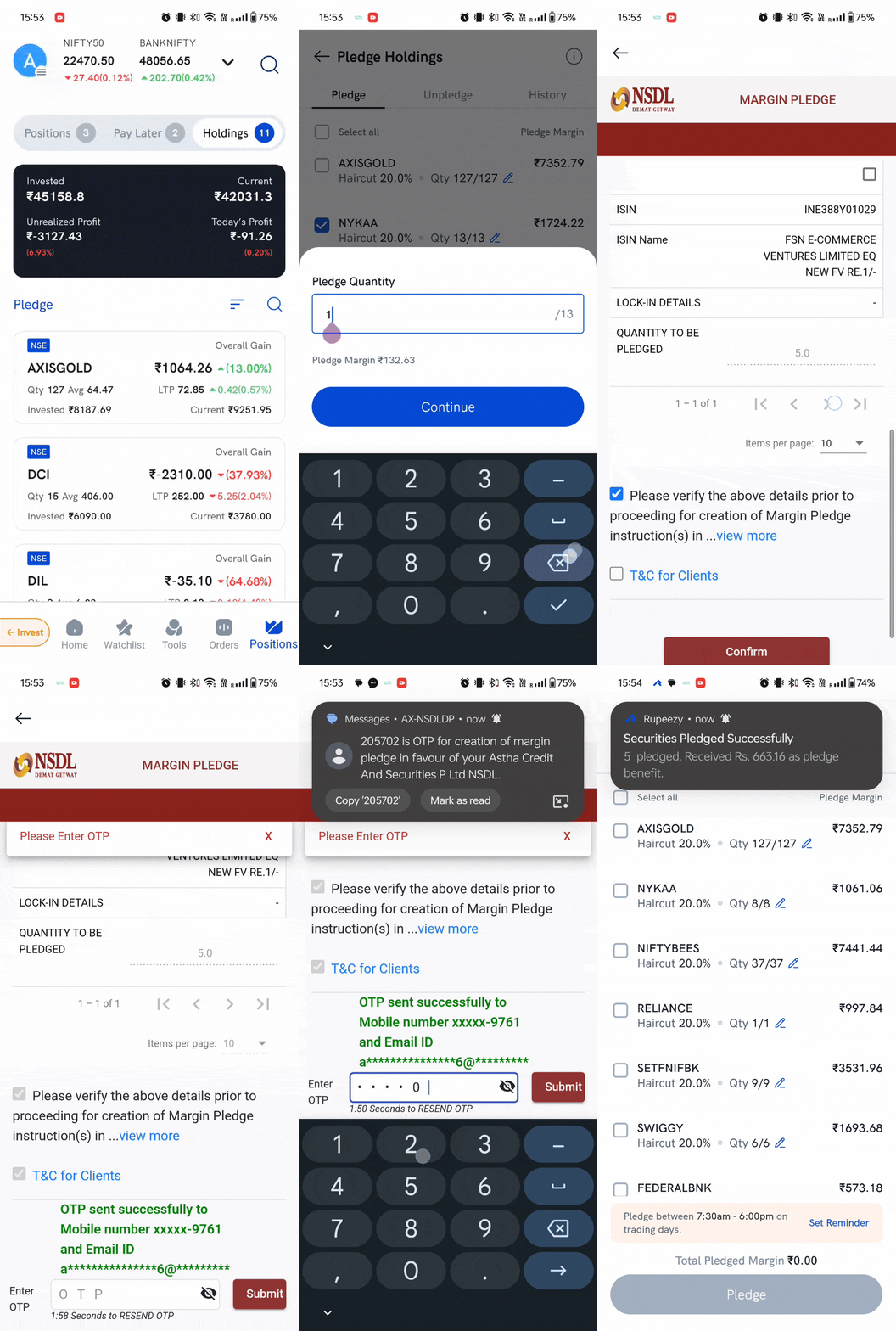
To pledge your shares for a trading margin (collateral margin), follow these steps in the Rupeezy app:
- Go to Positions > Holdings.
- Click on Pledge.
- Select the shares and the quantity you wish to pledge.
- Click on the Pledge button.
You will be redirected to the NSDL Margin Pledge page.
On the Margin Pledge page, select the shares, accept the terms and conditions, and click on Confirm.
An OTP will be sent to your registered mobile number and email ID (as per NSDL records).
Enter the OTP and click Submit.
Refer to the image below and follow the steps.
How do I unpledge shares?
To unpledge your shares using the Rupeezy app:
- Go to Positions > Holdings.
- Click on Pledge.
- Navigate to the Unpledge tab.
- Select the shares and the quantity you wish to unpledge.
- Click on the Unpledge button.
Note: The pledge window is available from 7:30 AM to 6:00 PM on trading days.
Unpledge Request Cut-off Time: Requests placed before 4:00 PM are processed the same day. Requests after 4:00 PM are processed the next working day.
Are there charges for pledging or unpledging?
Both pledging and unpledging are charged ₹25 + GST per pledge. If you pledged your shares on more than one day, they count as separate pledges, so unpledging them can carry more than one charge.
For a full breakdown of how these charges are counted, see How are pledge and unpledge charges calculated? For the complete charge list, see the Rupeezy pricing page.