
Rupeezy introduces Stock SIP (Systematic Investment Plan) to help investors automate their stock investments, similar to Mutual Fund SIPs. With Stock SIP, you can regularly invest in individual stocks based on predefined parameters, making investing simple, disciplined, and hassle-free.
Key features of Stock SIP
- SIP Modes: Rupeezy offers two modes of stock SIPs
-
Stock SIP in Delivery Mode: Available for all tradeable stocks
-
Stock SIP in MTF Mode: Available for stocks eligible for MTF Segment
-
- Flexible SIP Setup:
-
Frequency Options: Daily, Weekly, Monthly.
-
SIP Types:
-
Amount-Based SIP: Specify an investment amount; Rupeezy will purchase the maximum number of shares within this limit.
-
Quantity-Based SIP: Specify the number of shares; You need to maintain enough balance in your Rupeezy Account for the SIP orders to trigger.
-
-
- Seamless Execution:
- Orders are placed automatically at your preferred time, starting from 9:15 AM to 3:15 PM.
- Price Fluctuations:
- Rupeezy sends a notification for adding funds if stock prices rise sharply and the balance maintained by you is not sufficient to place orders.
- Manage Your SIPs with Ease:
-
Pause/Delete: Pause or remove your SIP anytime from the Stock SIP list.
-
Edit: Modify the amount, frequency, or preferred trigger time.
Note: Modifying your SIP skips one installment of you SIP
-
Track: View active SIPs from your “Holdings” or "Orders" screen of Rupeezy App.
-
How do I start a Stock SIP?
You can start a Stock SIP from two places in the app.
From a stock's detail page
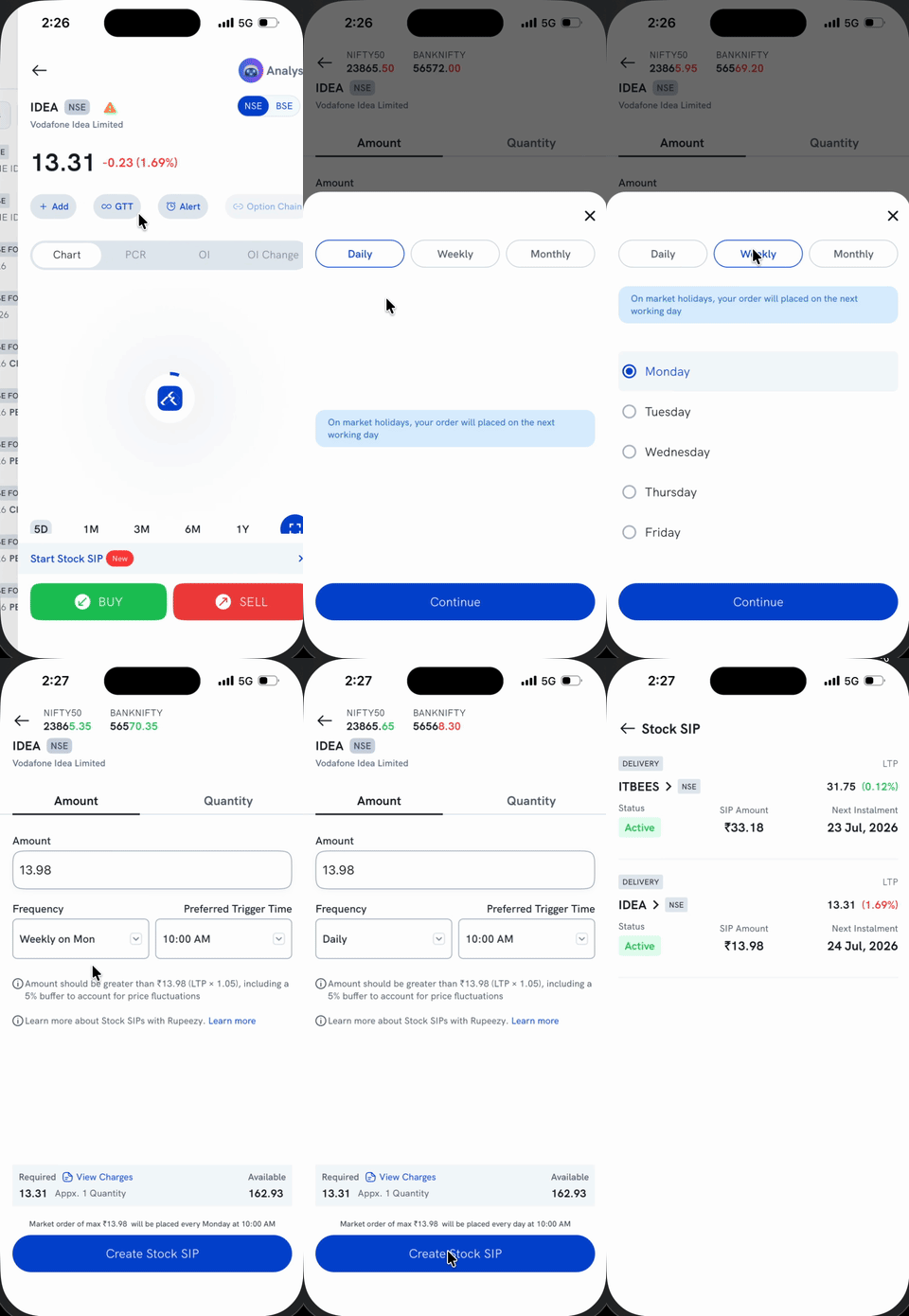
- Open the stock's detail page and tap Start Stock SIP, above the Buy/Sell buttons.
- Choose the Amount or Quantity tab and set your investment value.
- Tap Frequency and choose Daily, Weekly, or Monthly — Weekly also lets you pick a day (Monday to Friday) to trigger on.
- Set your Preferred Trigger Time, then tap Create Stock SIP.
From your Watchlist
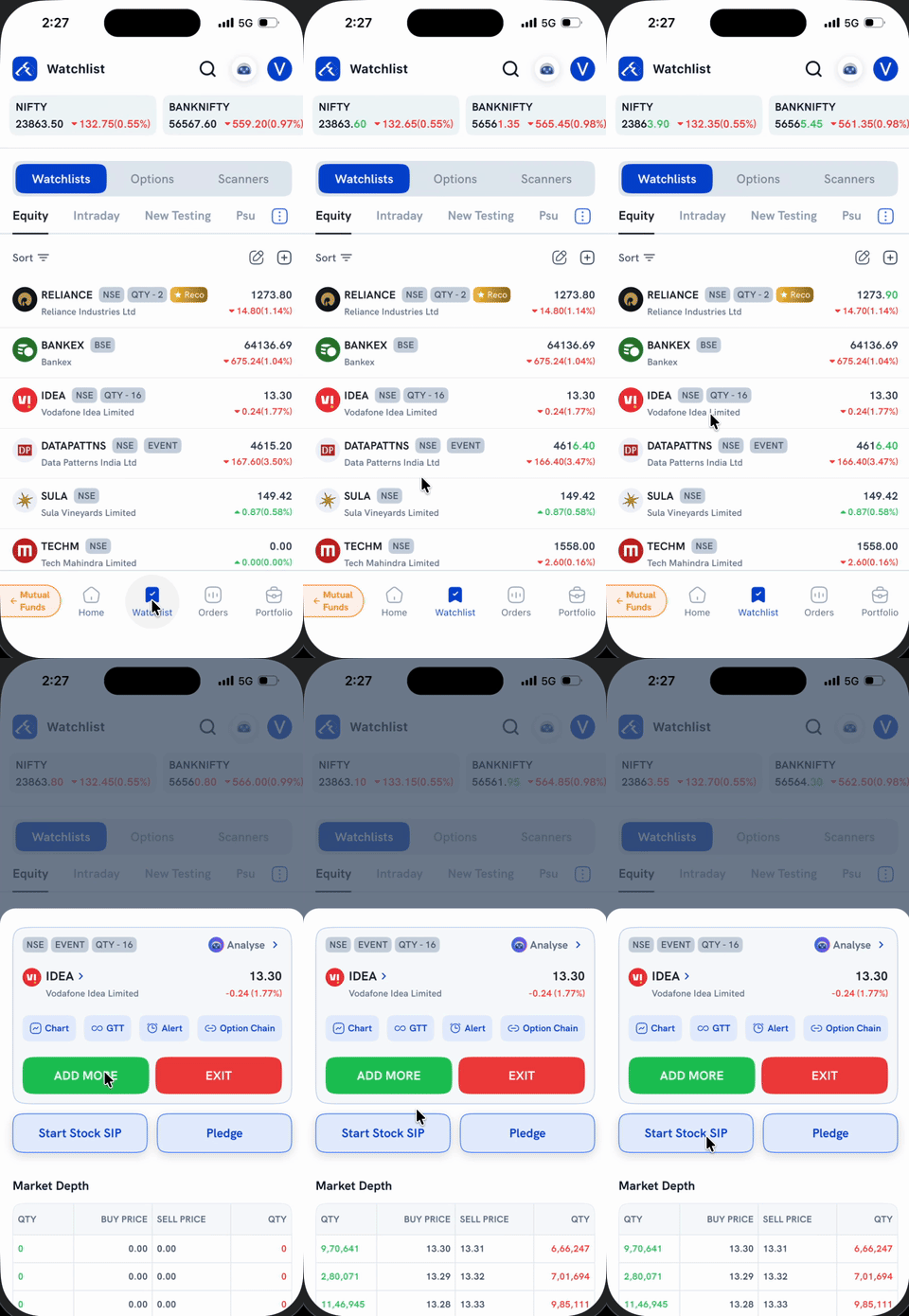
Tap a stock in your Watchlist to open its quick-actions sheet, then tap Start Stock SIP — this takes you to the same Amount/Frequency screen as above.
Once created, your SIP shows up as Active under Stock SIP (view it from the Holdings or Orders screen), along with its amount and next instalment date.
How do I manage my SIP?
Go to the Portfolio tab → Holdings, then tap Stock SIP to see all your active SIPs, their amount, and next instalment date. Tap a SIP to change its amount, frequency, or trigger time, or to pause/delete it — see How do I modify a Stock SIP? for the full walkthrough. Rupeezy also notifies you about order executions, rejections, and fund requirements for your SIPs.
Important considerations
-
Order Execution Priority: Orders are executed based on SIP creation time.
If there are multiple SIP to be triggered at the same time, SIP are executed based on the time they were created. First created SIPs are triggered first.
-
Handling Multiple SIPs: If you have multiple Stock SIPs, and you only have sufficient balance for 1 of these SIP, the SIP which was created first will get executed.
-
Corporate Actions: Stock splits, bonus issues, rights issues don’t affect your SIPs
-
Trading Holidays: SIPs scheduled on holidays will be executed on the next trading day.
Frequently asked questions (FAQs)
-
Can I create an SIP without a payment mandate?
Yes, Rupeezy allows SIPs without mandates. Ensure your trading account has sufficient balance before execution.
-
What happens if my balance is insufficient?
Orders will be rejected, but you'll receive notifications to add funds.
-
Can I choose my SIP execution time?
Yes, select your preferred time between 9:15 AM and 3:15 PM.
-
Can I set up a Stock SIP for more than stocks?
Yes, you can create multiple stock SIPs with Rupeezy
-
Can I automate SIP Payments for my stock SIPs?
Currently, you need to maintain sufficient balance in your trading account. Rupeezy is working on bringing you a mandate based payment for Stock SIPs to further enhance investing experience.
Need help?
For further assistance, reach out to Rupeezy Support through the app or website. Happy investing!